
Craft Apps in your browser, with nothing to install
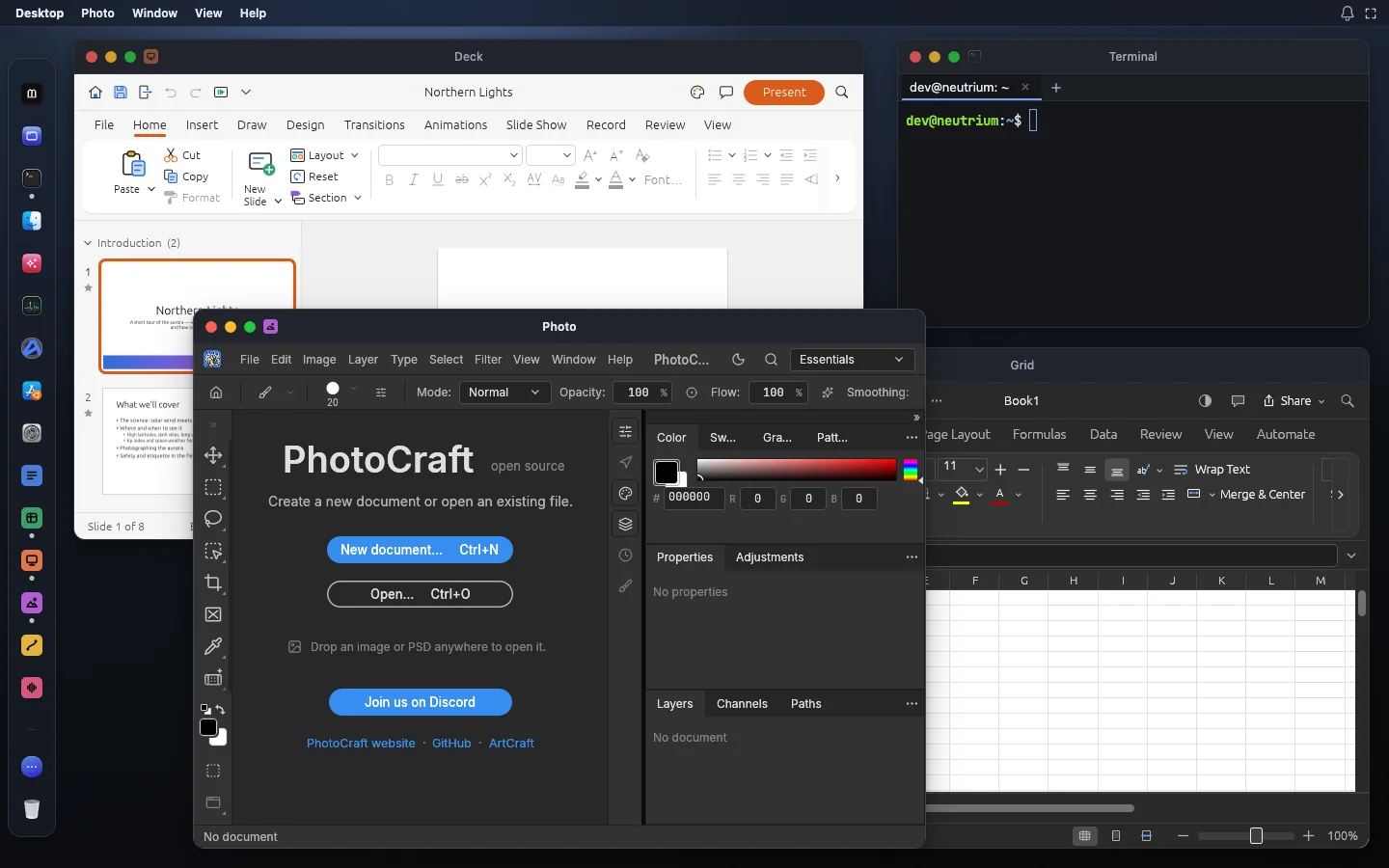
13 open-source apps, PhotoCraft, WordCraft and GridCraft among them, open side by side on the Madosuite Desktop in one tab. Free, with your files on your own device.
The apps are the work of the ArtCraft team. Madosuite is not ArtCraft and is not affiliated with it.
Documents
 WordCraft
Word processor
Write and lay out documents with the ribbon, styles, tables, track changes and references you already know, and save real .docx files.
In Madosuite: Word GridCraft
Spreadsheet
Spreadsheets with 500+ functions, dynamic arrays, pivot tables and charts, saved as .xlsx.
In Madosuite: Grid DeckCraft
Presentation app
Build slide decks with themes, charts, transitions and animations, open and save .pptx, and present full screen.
In Madosuite: Deck PdfCraft
PDF reader and editor
Read, organise, combine, split, fill, comment, redact and secure PDFs.
In Madosuite: PDFPictures and design
 PhotoCraft
Image editor
Edit images with layers, masks, adjustment layers, layer styles and type, and open and save real .psd files.
In Madosuite: Photo VectorCraft
Vector illustration app
Draw with the Pen, Pathfinder and Shape Builder across many artboards, and open .ai, .svg and .pdf files.
In Madosuite: Vector LightCraft
Photo library and raw editor
Develop raw photos without touching the originals, and keep your library of albums, ratings and people.
In Madosuite: Light FigCraft
Interface design tool
Design interfaces with frames, auto layout, components, variants and variables, then prototype them.
In Madosuite: Fig DesignCraft
Page layout and desktop publishing app
Lay out magazines, books and brochures with parent pages, threaded text, styles and print-ready PDF.
In Madosuite: DesignVideo and sound
 FilmCraft
Video editor
Cut video on a multi-track timeline with trimming, colour grading, effects, titles and loudness meters.
In Madosuite: Film EffectCraft
Motion graphics and VFX app
Animate with compositions, layers, keyframes, expressions and 308 effects, and render video or Lottie.
In Madosuite: Effect SoundCraft
Audio editor and DAW
Record, edit and mix audio on a multitrack timeline with a full mixer, automation and MIDI.
In Madosuite: Sound
How to open one
Open the Desktop in a browser on a computer. There is no sign-up.
Press an app in the dock. Fig, Design, Effect and Light are added from the Store in one click.
Put your file in Files on the Desktop and open it. Every app sees the same folder.
Apps of the same family that Madosuite does not run yet: AniCraft, TextureCraft, MaterialCraft. For small jobs, the tools in the page need no Desktop.
The source code of each app
All of them are open source, by the ArtCraft team, on GitHub, under MIT or Apache-2.0. Star them or report a problem to the makers there.
| App | In Madosuite | Version here | GitHub |
|---|---|---|---|
| WordCraft | Word | 0.13.2 | storytold/wordcraft |
| GridCraft | Grid | 0.14.2 | storytold/gridcraft |
| DeckCraft | Deck | 0.13.1 | storytold/deckcraft |
| PhotoCraft | Photo | 0.18.0 | storytold/photocraft |
| VectorCraft | Vector | 0.19.0 | storytold/vectorcraft |
| SoundCraft | Sound | 0.15.0 | storytold/soundcraft |
| FilmCraft | Film | 0.15.0 | storytold/filmcraft |
| CADCraft | CAD | 0.15.1 | storytold/cadcraft |
| PdfCraft | 0.16.1 | storytold/pdfcraft | |
| FigCraft | Fig | 0.13.1 | storytold/figcraft |
| DesignCraft | Design | 0.15.2 | storytold/designcraft |
| EffectCraft | Effect | 0.19.0 | storytold/effectcraft |
| LightCraft | Light | 0.16.0 | storytold/lightcraft |
Questions
Can I use PhotoCraft and the other Craft Apps online?
Yes. Open the Madosuite Desktop in a browser on a computer, then open an app from the dock or add it from the Store: WordCraft, GridCraft, DeckCraft, PhotoCraft, VectorCraft, SoundCraft, FilmCraft, CADCraft, PdfCraft, FigCraft, DesignCraft, EffectCraft, LightCraft.
Is Madosuite made by ArtCraft?
No. The apps are the ArtCraft team’s, open source under the MIT or Apache-2.0 licence. Madosuite is a separate site that runs them on its own desktop, under its own names. The originals are at getartcraft.com/apps.
How is it different from installing them?
An installed app uses the whole computer and may be a newer version. In the browser there is nothing to install, it works on a computer where you may not install, and several apps share one folder of files.
Is Madosuite free?
Yes. The apps run on your own device, in the browser tab, so there is no server time to pay for. There is no trial period.
Where are my files kept?
In the browser on your device, inside Madosuite’s own Linux machine, in its home folder. Your files are not uploaded to us. Clearing the site’s data in your browser deletes them, so download what you want to keep.
Are the apps finished?
No, and we say so on every app’s page. They are young open-source apps, alpha or earlier, and their makers publish how far along each one is. Many everyday jobs work today; check the list of what is missing before you depend on one.