
Check the signature of a PDF
Who signed this PDF, when, and is it unchanged since?
- Free, no sign-up
- Nothing is uploaded
- Many files at once
 Before PDF, 24 KBAfter TXT, 490 B
or drop them here
PDF. Stays on your device, never uploaded.
How to use Verify signature
Choose your files, or drop them in the box.
Change the options and watch the result on the page.
Happy with it? Press Verify signature, then download the new file.
What you get
- Every signature in the file, one by one
- Finds changes made after signing
- Shows the signer, the issuer and the dates of the certificate
- Several PDFs in one go
What to know first
- Whether the certificate is trusted is not decided here: it depends on the trust list of your reader.
- It does not ask the issuer whether the certificate was withdrawn.
- A drawn signature is a picture and cannot be checked.
Need more? Full programs, right in your browser
Nothing to download or install: the program opens in this browser tab. Free, and your files stay on your device.

Questions
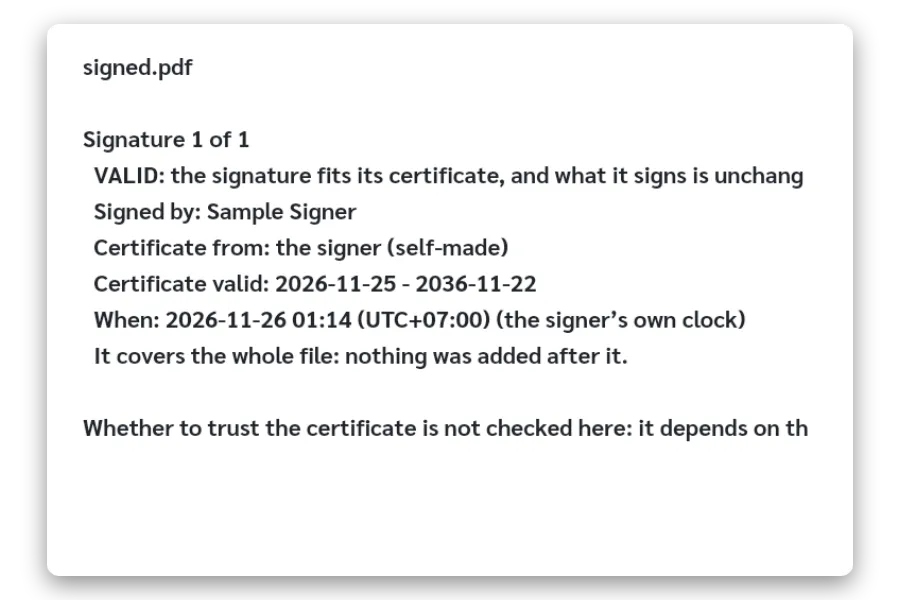
What does VALID mean here?
The signature fits its certificate and the part it signs is unchanged. It does not say the certificate’s owner is who you think: compare the issuer with one you know.
What if something was added after signing?
You see how much was added. The signature does not cover it, so look at what changed.
Which signatures can it read?
PAdES and the Adobe kinds with RSA or common elliptic-curve keys, and timestamps.
Is my file uploaded?
No. The page loads the converter into your browser and your device does the work. Run a tool once, switch off the internet and run it again: it still works. The page’s security rules also stop it from connecting to any other site.
Is it free? Is there a limit?
Free, with no sign-up, no watermark and no daily limit. The limit is your device’s memory, because the work happens there.
Guides
Compare a download with the maker’s hash in your browser, know which kind to use, and understand what a match does and does not tell you.
Sign a PDF: a drawn signature or a digital one?What each kind of signature proves, how to sign in a minute, how to make a clean PNG of your own signature, and when you need a certificate.
People also use
More PDF tools
Merge, split, compress, convert, unlock, protect, sign and edit PDFs free in your browser. Your files stay on your device. No sign-up.