
Combine many Excel files into one table
Drop all the files on Merge Excel, choose One long table, and download. Columns are matched by their heading, so January can have Price before Qty and February the other way round. Nothing is uploaded, which is the point when the files are payroll.
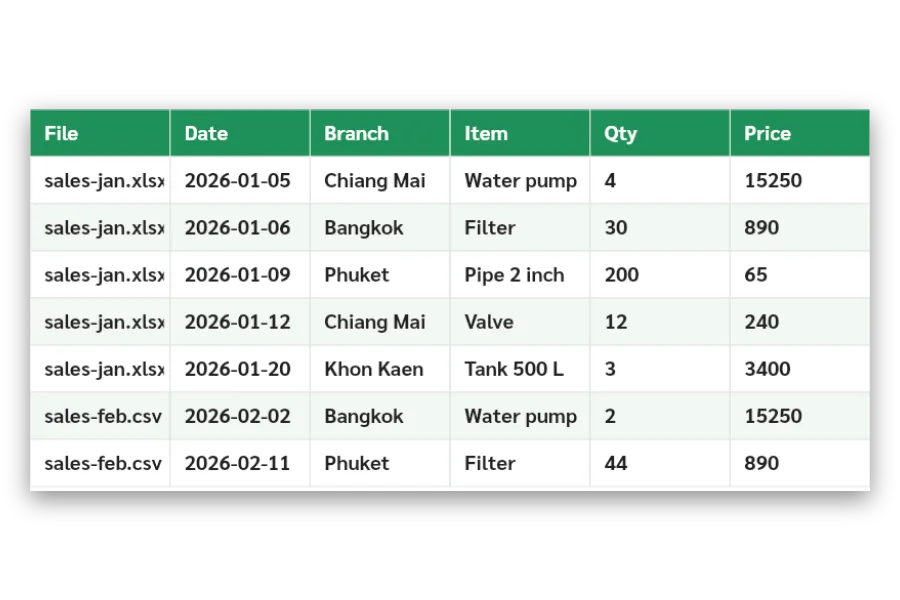
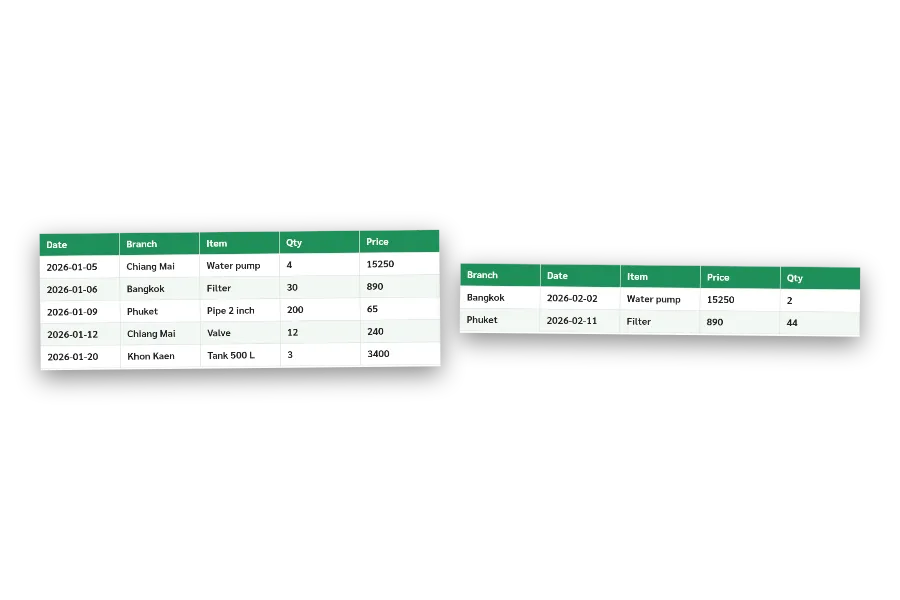 Before XLSX + CSV, 2 KBAfter XLSX, 2 KB
Copy and paste is where it goes wrong
Twelve files by hand means twelve chances to paste under the wrong column, to bring the heading row along, or to skip a file after a phone call. The errors do not look like errors; the total is just a little off. A tool that matches headings removes the first two, and a column with the file name proves the third.
Join them
- Open each file once. The heading must be the first row. Delete title rows above it.
- Give the same thing the same heading: “Qty” everywhere, not “Qty”, “Quantity” and “จำนวน”.
- Open Merge Excel, press Choose files and choose them all.
- Under Put together as choose One long table. Leave The first row is a heading and Say which file each row is from on.
- Data spread over several sheets comes along by itself: every sheet with the same headings as the first is added, and a notes sheet is left out.
- Look at the table on the page and press Download.
What our samples gave
sales-jan.xlsx has five rows with columns Date, Branch, Item, Qty, Price. sales-feb.csv has two rows with Branch, Date, Item, Price, Qty. The result has seven rows:
| File | Date | Branch | Item | Qty | Price |
|---|---|---|---|---|---|
| sales-jan.xlsx | 2026-01-05 | Chiang Mai | Water pump | 4 | 15250 |
| … | |||||
| sales-feb.csv | 2026-02-02 | Bangkok | Water pump | 2 | 15250 |
February’s Price went under Price, although it stood in another place.
Check that nothing was lost
- Rows out = rows in. Add up the rows of each file (without headings). Filter the File column: every file should be in the list.
- Sum one money column in the result and compare it with the sum of the files.
- Look at the far right. A lonely extra column means a heading was spelled differently somewhere.
- Sort by date and look at both ends.
What goes wrong
Two columns for the same thing. “Branch” and “Branch “ with a space. Fix the heading and merge again; never move cells by hand afterwards.
Phone numbers lost their 0. They were numbers before they came here. In the source, make the column text. A CSV is safer: CSV to Excel keeps 0812345678 whole.
Subtotals doubled the total. Delete subtotal rows in the sources.
The file is empty. The data sits on the second sheet. Turn on every sheet.
You wanted separate tabs. Choose One workbook, a sheet each instead.
Next
Overlapping exports bring the same row twice: Remove duplicate rows says how many went. For a summary, use a pivot table. To send each branch its own part of a workbook, Split Excel makes a file for each sheet.
When to use something else
If the same files arrive every month, Power Query in Excel (Data, Get Data, From Folder) remembers the steps and refreshes with a click, formulas and all. For hundreds of megabytes, use a database or Python. If you need the formulas, copy the sheets inside Excel. For the monthly “please put these together by noon”, this is quicker than all of them.
Questions
Do formulas and colours survive?
No. Values are kept. Formulas, colours and charts are not carried over, so treat the result as data.
Can I join .csv with .xlsx?
Yes. xlsx, xls, ods, csv and tsv together.

