
Turn a bank statement PDF into an Excel sheet
PDF to Excel reads where each word stands on the page and puts it into rows and columns. It does well on plain tables and needs checking on statements with long descriptions. Your account history stays on your computer while it works.
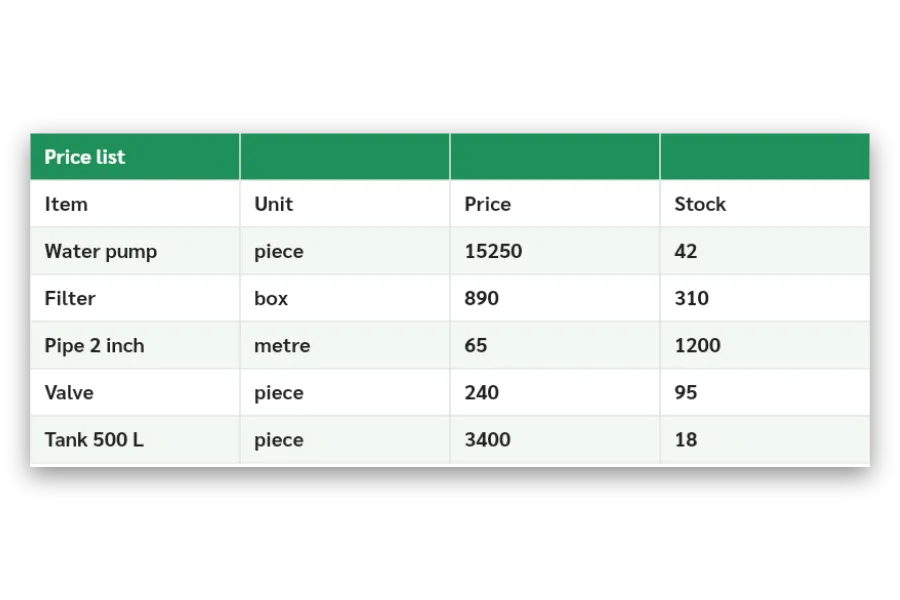
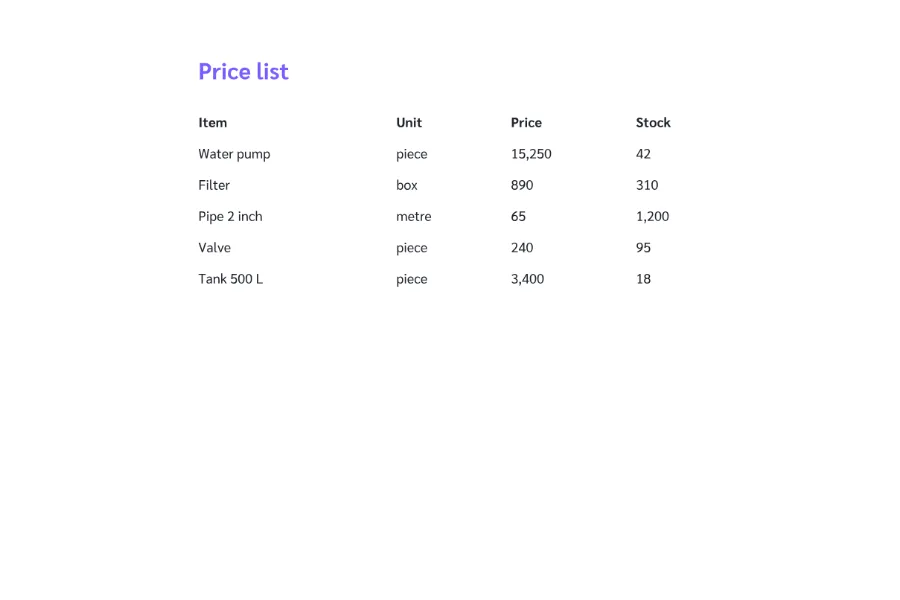 Before PDF, 7 KBAfter XLSX, 4 KB
Will this statement convert well?
Open the PDF and drag the mouse across one line. If words are selected, there is text to read. If the whole page turns blue, it is a picture and needs OCR. If it asks for a password, unlock it first with the one from your bank.
Then look at the layout. One line for each transaction is easy. A description that wraps onto two lines is where columns slip.
Convert
- Open PDF to Excel and press Choose files. Several months can go together.
- Choose Excel (.xlsx), or CSV for an accounting program.
- Look at the table on the page and press Download.
- Delete the rows that are not transactions: the bank’s address, page headings, “brought forward”.
- Put a heading row on top and freeze it.
Our sample price list came through whole: five rows, four columns (Item, Unit, Price, Stock), with 15,250 and 1,200 as they stood on the page. The title “Price list” took a row of its own, which is the sort of thing step 4 is for.
Fix the usual faults
An amount in the wrong column. Deposits and withdrawals share a line. Sort by the column and the odd ones stand out; move those by hand.
A description split over two rows. The second row has no date. Filter for blank dates, join the text to the row above, delete the rest.
Numbers that will not add. Use find and replace to remove the currency sign and spaces. A minus at the end (1,250.00-) needs to move to the front.
Dates as text. Split the day, month and year with Text to Columns, or a formula. Watch for Buddhist years: 2569 is 2026.
Prove it with the bank’s own numbers
This is the step that makes the sheet worth having. A statement prints an opening balance, a closing balance, and often totals.
opening + sum of deposits − sum of withdrawals = closing
If that is true to the satang, nothing was lost. If it is not, take the difference and search the sheet for that number, then for half of it: half usually means one amount sits in the wrong column.
Then count the transactions per page on the PDF for one page and compare.
A year in one table
Convert each month, give all of them the same headings, and join them with Merge Excel. The File column tells you the month. From there, a pivot table gives spending by month in a minute.
When to do it another way
Look in your bank’s app or website first. Many can export CSV or Excel, and that export has no errors to fix. Accounting programs can connect to banks directly. If the statement is for a loan or a visa, the office wants the PDF, not your sheet.
For tables with merged cells, multi-line headings or sideways text, copying by hand may be quicker than repairing. And if the PDF was made from a spreadsheet by a colleague, ask for the spreadsheet.
Questions
My statement is a scan. What now?
A scan has no text to read. Run OCR PDF first, then convert, and check every amount against the paper.
Why are some amounts text?
A space, a currency sign or a minus at the end makes a spreadsheet treat them as words. Replace those and the numbers return.